Focus time by default.

Your favorite websites come back at recess. Recess blocks the sites and apps that pull you away, and gives them back only during the breaks you schedule.

The download is waiting on Apple's notarization. Leave your email and you'll hear the day it's up. Nothing else.

macOS 14 or later / Apple silicon / signed and notarized / 14 days free

Three steps. Then hands off.

Setup takes a few minutes

  1. 01

    List what pulls you away.

    Websites, and optionally apps. During focus time the sites stop loading everywhere, and blocked apps are quit within seconds of opening.

  2. 02

    Schedule recess.

    Name your breaks, per weekday if you like, or start from a template and adjust the hours.

  3. 03

    Seal it.

    Choose a long, random password and hand it to someone you trust, then delete your copy. From here on, nothing changes without it.

Start from a method.

Nine templates, each a known way of working. A template turns into ordinary break windows you can edit afterwards, with your own hours and days.

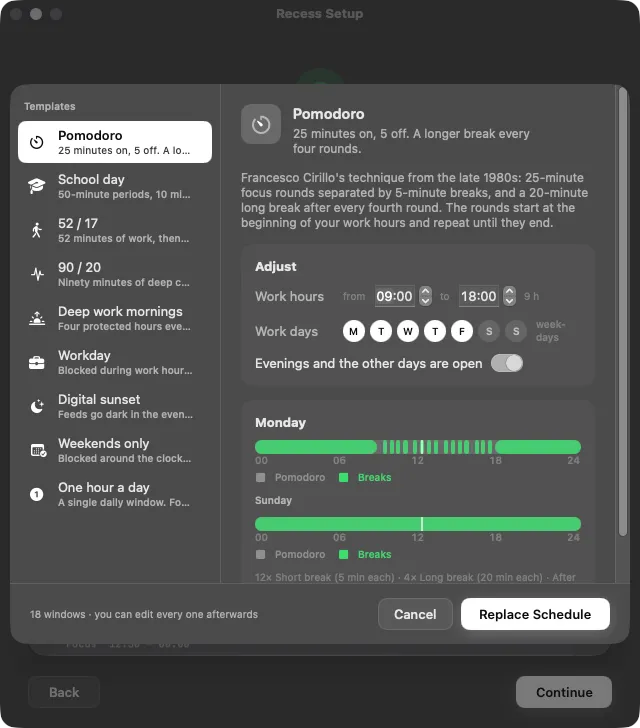
The Start from a template sheet in Recess Setup: Pomodoro selected in the list of nine templates, its work hours and work days, and a preview of Monday and Sunday as timelines with green breaks.
Pick a template, adjust the hours and days, and preview the week before applying it.

Pomodoro

25 minutes on, 5 off. A longer break every four rounds.

Francesco Cirillo's technique from the late 1980s: 25-minute focus rounds separated by 5-minute breaks, and a 20-minute long break after every fourth round. The rounds start at the beginning of your work hours and repeat until they end.

School day

50-minute periods, 10 minutes of recess, an hour for lunch.

The rhythm every school already runs on: a 50-minute class, 10 minutes of recess, repeat — with a full hour for lunch at 12:30. Familiar, forgiving, and easy to stick to.

52 / 17

52 minutes of work, then a 17-minute break.

From DeskTime's 2014 analysis of its most productive users, who tended to work in stretches of about 52 minutes followed by 17-minute breaks. Longer sprints than Pomodoro, and breaks long enough to actually leave the desk.

90 / 20

Ninety minutes of deep concentration, twenty of real rest.

Built on the ultradian rhythm: Nathaniel Kleitman's roughly 90-minute basic rest-activity cycle, which Ernest Rossi applied to work as 90 minutes of concentration followed by about 20 minutes of rest. Fewer, longer blocks for work that needs a run-up.

Deep work mornings

Four protected hours every morning, then the day opens up.

Cal Newport's rhythmic approach to deep work: the same protected block at the same time every day — about four hours, which is roughly as much deep work as a day holds — and the rest of the day open. Set your work hours to when the block should start.

Workday

Blocked during work hours, apart from lunch. Evenings and days off are open.

The classic nine-to-five fence: distractions are blocked while you work, with an hour off at lunch, and free once the workday ends. Nothing fancy — the schedule most people actually want.

Digital sunset

Feeds go dark in the evening and come back in the morning.

Screens off before bed: the sites are blocked from the evening until the morning, every day, and open the rest of the time. Named after the habit of putting devices away when the sun goes down — the schedule for better sleep rather than more work.

Weekends only

Blocked around the clock on weekdays. The weekend is yours.

Monk mode, Monday to Friday: nothing comes back during the week, not even in the evening, and everything comes back on the weekend. Pick which days count as the week.

One hour a day

A single daily window. Focus time the rest of the day.

The strictest schedule that still has a release valve: one window a day — an hour in the evening by default — and the blocklist enforced the other 23. Good for a reset, or for feeds you want to keep but not live in.

Always counting down.

The menu bar shows how long until your next break. During a break the countdown runs from green to red. In the last minute of any phase, a pill drops out of the notch and counts the seconds.

Before a break, the pill offers +5m, +30m, +1h or a custom delay. Postponing needs no password: delaying a reward only tightens the commitment.

The notch pill: Break in 0:42, with +5m, +30m and +1h buttons and a more button.

The password is the point.

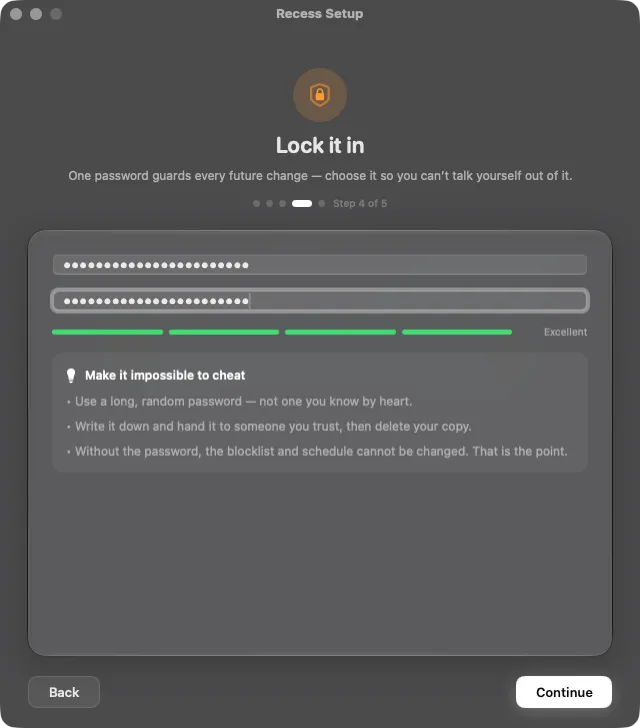
Setup ends with a password. Make it long and random, write it down, hand it to someone you trust, then delete your copy. After that, nothing loosens without it: not the lists, not the schedule, not pausing, not uninstalling.

Everything you can do without the password only makes things stricter. That asymmetry is the whole design.

Without the password
  • Postpone the next break
  • End a break early
  • Resume from a pause
  • Quit the menu bar app (nothing changes)
With the password
  • Change the website or app lists
  • Edit the schedule
  • Pause blocking, up to 8 hours
  • Uninstall
The Lock it in step of Recess Setup: two password fields, a strength meter reading Excellent, and three tips: use a long random password, hand it to someone you trust, and the blocklist cannot be changed without it.
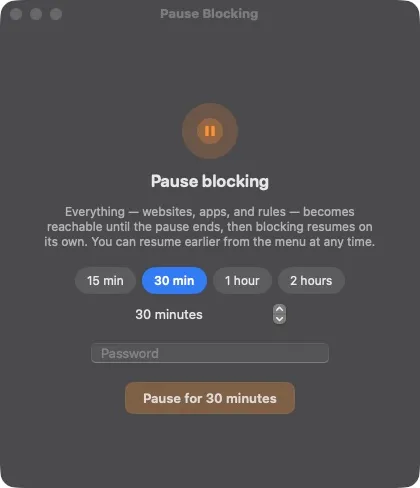
The Pause blocking dialog: presets of 15 minutes, 30 minutes, 1 hour and 2 hours, a password field, and a Pause for 30 minutes button.

Pause, with the password. Postpone, without.

Need everything reachable for a while? Pause blocking for 15 minutes to 8 hours. It asks for the password every time, and blocking comes back on its own when the pause ends. Resuming early needs no password.

Postponing a break is the opposite: it delays a reward, so it needs nothing. The break keeps its full length, moves once, and the rest of the schedule stays put. You can never postpone focus time: that would be cheating, and cheating needs the password.

Enforced for real.

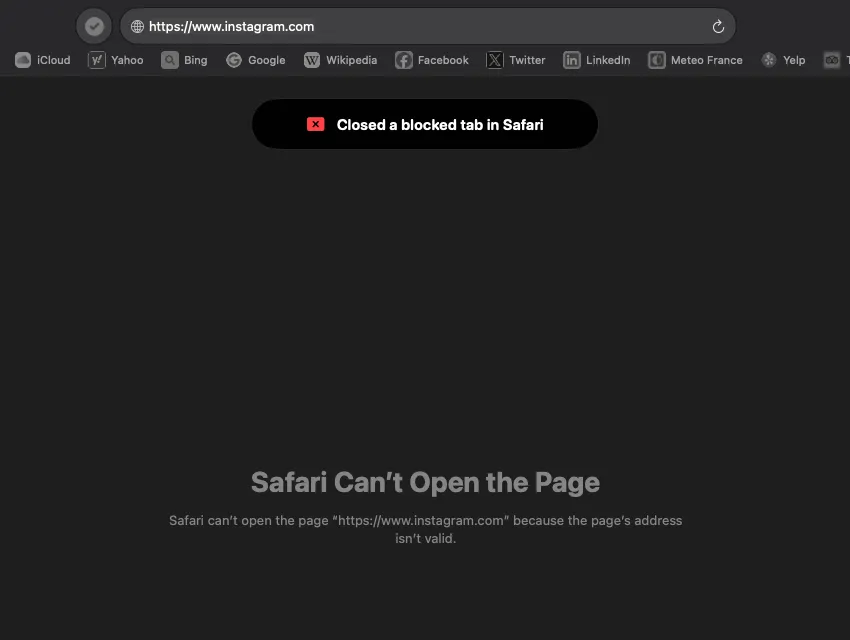
Safari showing Safari Can't Open the Page for instagram.com during focus time, with a red toast reading Closed a blocked tab in Safari.

A daemon, not an app.

Blocking lives in a system service with administrator rights that restarts itself. Quitting the menu bar app changes nothing.

Every browser, every app.

Blocked sites stop resolving wherever you open them, subdomains included. Blocked apps are quit within seconds of opening, and again if they come back.

Tabs you already had open.

A page that loaded before focus time does not get to stay. Every two seconds, tabs on blocked sites are closed, and a toast tells you so.

Works with VPNs.

A VPN that brings its own DNS would normally slip past a blocker. Recess puts a small filtering resolver in front of it, inside the tunnel, so nothing leaks.

Rules on their own timing.

Add extra websites or apps that block during focus, during breaks (Slack and Mail, so the break actually heals), always, or in custom slots.

No password, no changes.

Not the lists, not the schedule, not even uninstalling. Without it you can only make things stricter: postpone a break, end one early, resume from a pause.

100% local.

No account, no telemetry. Online only to activate a license and for a daily update check you can turn off.

Sounds like recess. Ding

Short 8-bit chimes mark the start of each break and focus block. Prefer it quieter? Switch to the softer Chimes theme, or turn them off.

Nothing leaves your Mac.

No account. No telemetry. No crash reports, no usage pings. Recess goes online for two things only: activating a license, when you ask it to, and a once-a-day look for a new version that sends nothing but its own version number, and that you can switch off.

What activation sends
  • Your license key
  • A SHA-256 hash of the Mac's hardware UUID, never the UUID itself
  • The Mac's name, as set in System Settings
  • The app version

That's the whole list. The answer is a signed token the app checks offline from then on.

What it can't do.

Recess is honest about where it stops. These are the real limits, in plain words.

A commitment device, not a security product.

Recess raises the cost of an impulse from one click to a deliberate, multi-step act. It is built for the person who set it up, not against an attacker.

An administrator who really wants it gone can remove it.

Anyone with admin rights can ultimately work around any local blocker, this one included. The password gate and the self-healing make that slow and conscious, not impossible.

Browsers with forced DNS-over-HTTPS bypass the website layer.

A browser that insists on its own encrypted resolver (Firefox with DoH forced on, for example) never asks the Mac to look up a name. Turn that setting off if you are serious.

Already-loaded pages can linger for a few seconds.

A video that was already streaming holds a warm connection for a moment after a block starts. Recess flushes caches and closes the tab within seconds, not instantly.

One license. Every tool.

doomscrolling.sucks license Every tool in the suite, one Mac at a time
$49 once
  • Unlocks Recess today, and every doomscrolling.sucks tool that follows.
  • 14-day free trial of each tool, with every feature.
  • Blocking never depends on the license. After the trial, only configuration changes need one.
  • Your key is emailed right after checkout: DOOM-XXXX-XXXX-XXXX-XXXX
  • Moving to a new Mac is two clicks: deactivate in Settings ▸ License, activate on the new one.
  • Signed and notarized installer, straight from us.

The download is waiting on Apple's notarization. Leave your email and you'll hear the day it's up. Nothing else.

Checkout opens with the download. $49 once, or €43.80 in Europe, taxes included.

Requirements.

  • macOS 14 Sonoma or later. Liquid Glass look on macOS 26, a material fallback on 14 and 15.
  • Apple silicon. The installer targets arm64; Intel Macs are not supported.
  • An administrator password at install. Blocking runs in a system service, so the installer asks for it once.
  • Port 53 on localhost free. Only matters with a VPN: the filtering resolver listens on 127.0.0.1:53, so a local dnsmasq would get in its way.

Questions.

Is there a subscription?

No. One doomscrolling.sucks license is $49 once. It unlocks Recess and every tool that follows, on one Mac at a time. No account either.

Do I buy Recess or a license?

The license. You buy a doomscrolling.sucks license, and it unlocks every tool in the suite, present and future. Today that is Recess. The key arrives by email from licenses@doomscrolling.sucks right after checkout.

What happens when the trial ends?

Blocking continues exactly as configured. Only changing your lists or schedule needs a license. Letting the trial lapse is not a way out.

Can I just quit the app?

You can, and nothing changes. The blocking runs in a system service that keeps going without the menu bar app and restarts itself.

Can I uninstall it?

Yes, with the password. The uninstaller refuses to run without it while a configuration exists, by design.

Can it be bypassed?

By someone with administrator rights who is determined, yes. Recess is a commitment device: it makes cheating a deliberate, multi-step act instead of a reflex. The limits are listed above, in full.

Does Recess collect any data?

No. It runs 100% locally. The only network call is license activation, which sends the key, a hash of your Mac’s hardware identifier, the Mac’s name and the app version.

Can I move my license to a new Mac?

Yes, one Mac at a time. On the old Mac open Settings, go to License and click Deactivate this Mac. Then activate with the same key on the new one.

Does it work with a VPN?

Yes. When a VPN brings its own DNS resolver, Recess places its filtering resolver in front of it, inside the tunnel. Blocked names fail; everything else goes through the VPN as before.

Is it on the Mac App Store?

No. Recess is a direct download, signed and notarized, because blocking runs in a system service that needs an installer with administrator rights.

Does it run on Intel Macs?

No. Recess needs an Apple silicon Mac running macOS 14 Sonoma or later.